Note
Click here to download the full example code
Create an Intimate Mixture using Shkuratov model
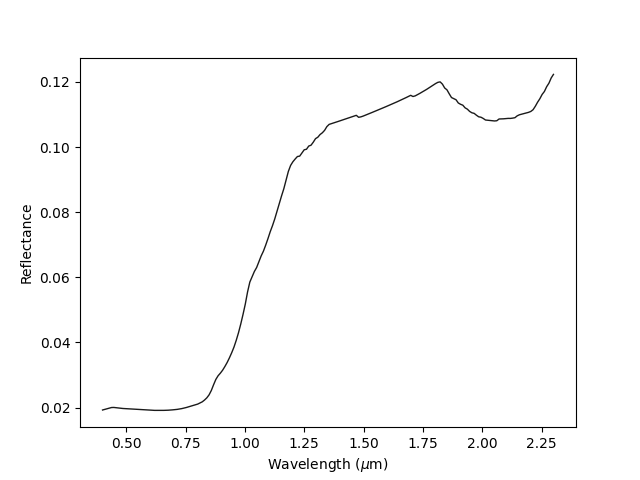
Out:
Spectrum([(0.4, 0.019268396053110592),
          (0.40954773869346733, 0.0194683575496164),
          (0.4190954773869347, 0.019657566378175062),
          (0.428643216080402, 0.019842163047208317),
           ...
          (2.2713567839195976, 0.11852078118870057),
          (2.2809045226130653, 0.1196004118074292),
          (2.2904522613065326, 0.1212003857381756),
          (2.3, 0.12229786301836931)],
          columns=(w, r),
          label="modeled_spec")
Albedo:  0.01949254400592157
import sdoc
from cana.composition import read_constant_batch, IntimateMixture
import numpy as np

# First load an spectrum, we will just gonna use one from the SDOC database.
# See more about SDOC at https://https://github.com/depra/sdoc
# Alternatively, you can read your own optical constant using:
# oc = cana.read_constant('path to your optical constant file')

# First initialize SDOC
sdb = sdoc.SDOC(mode='r')

# To see what is inside the database: sdb.contents
# Here we will just show an example for a titan tholin and ice tholin
ocs_label, ocs_data = sdb.get_constant_batch(['T_0', 'I_0'])

ocs = read_constant_batch(ocs_data, labels=ocs_label)

# Initializing the model
mixture = IntimateMixture(samples=ocs,
                          grainsizes=[30, 100],
                          porosity=0.5)

# Build the wavelentgh axis
w = np.linspace(0.4, 2.3, 200)

spec, albedo = mixture.make(wavelengths=w)
# Plot the optical constant
spec.plot()

# Print the spectrum and albedo
print(spec)
print('Albedo: ', albedo)
Total running time of the script: ( 0 minutes 0.165 seconds)